

MeOS
MeOS sends start lists, results and the times at its online controls to OResults over the MeOS Online Protocol, and reads the punches of your OResults online controls back over the ROC protocol.
Before you begin
Section titled “Before you begin”- The event’s API key. See Connect your software with the API key on the Upload start lists and results page.
- The event’s Start date, Start time and Timezone set to those of your competition, under Event info on the event’s Event & Access page.
- To receive punches: the event ID, the number after
/events/in the event’s address in OResults.
Send data to OResults
Section titled “Send data to OResults”-
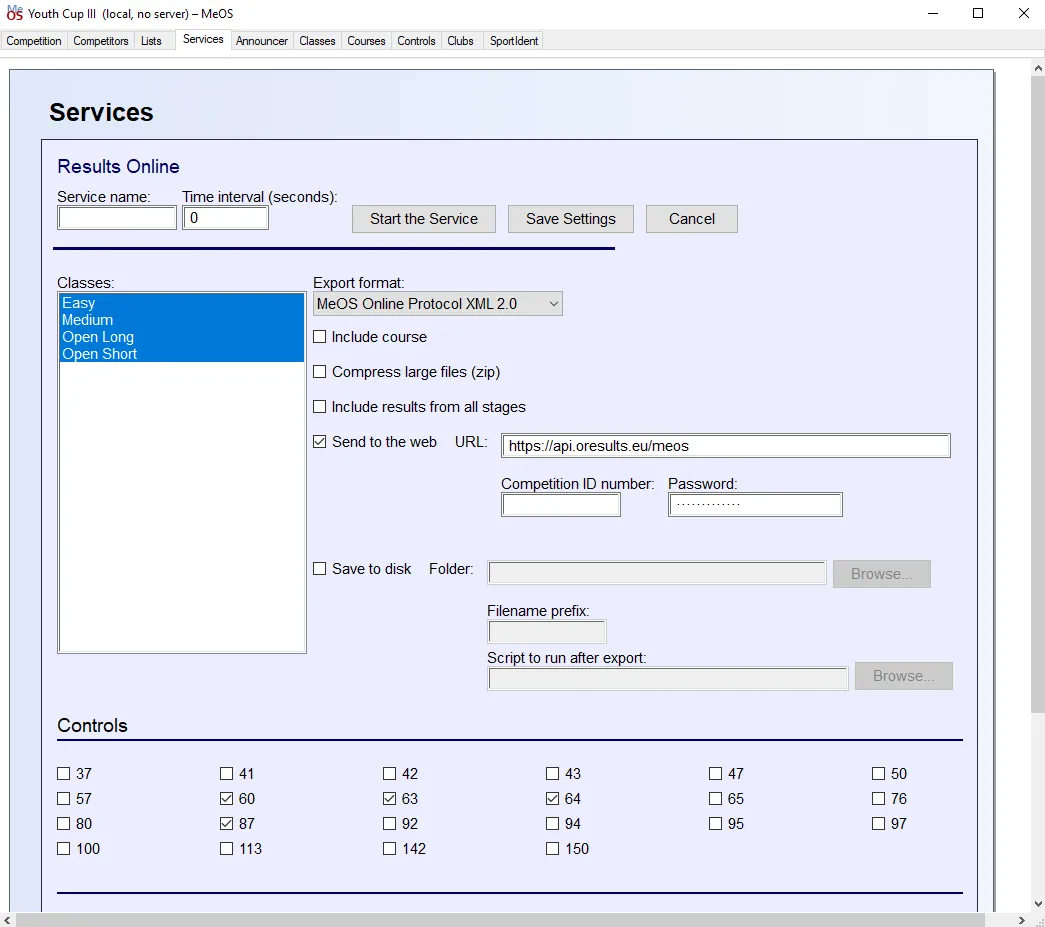
In MeOS, open the Services tab and select Results Online under Available services.
-
Set Export format to MeOS Online Protocol XML 2.0.
-
Tick Send to the web and set URL to
https://api.oresults.eu/meos. -
Paste the event’s API key into Password. Leave Competition ID number empty; OResults finds the event by the key.
-
Under Controls, tick every control that is an online control. MeOS sends the time each runner reached a ticked control. OResults stores it as a punch of the runner’s SI card, so the split appears without setting that control up in OResults.
-
Set Time interval (seconds) and select Start the Service.
-
Check that the runners arrived, as the last step of Connect your software with the API key describes.
The MeOS Online Protocol section of the Public API page describes what OResults accepts.
Receive punches from OResults
Section titled “Receive punches from OResults”- In MeOS, open the Services tab and select Remote Input under Available services.
- Set Type to Radio Online Control (ROC).
- Set URL to
https://api.oresults.eu/roc. - Leave Use Unit ID instead of competition ID unticked and enter the event ID in Competition ID number.
- Select Start the Service.
The ROC protocol section of the Public API page describes the endpoint itself.
This is based on our best knowledge of the software; later versions may have changed. If something behaves unexpectedly, contact us.
Troubleshooting
Section titled “Troubleshooting”Send data to OResults
Section titled “Send data to OResults”Response from remote server: Wrong password: Password is empty, or holds a key that belongs to no OResults event. Copy the key again from Automation on the event’s Event & Access page and paste it into Password.
Response from remote server: Server error: OResults could not read what MeOS sent. Check that Export format is MeOS Online Protocol XML 2.0.
Times from MeOS are off by whole hours or days: OResults reads each start time from MeOS as a local time on the event’s Start date, in the event’s Timezone, and one of the two differs from your competition. Correct Start date and Timezone under Event info on the event’s Event & Access page and select Save changes. Runners MeOS already sent keep their old times until MeOS sends them again.
Receive punches from OResults
Section titled “Receive punches from OResults”MeOS receives no punches, or their times are off by whole hours: MeOS asks OResults for the punches after its competition date and zero time. OResults reads that zero time in the event’s Timezone and writes each punch time in it too, so a wrong Timezone shifts both. Correct Timezone under Event info on the event’s Event & Access page and select Save changes. MeOS cannot fetch punches from before its zero time, so set the zero time in MeOS before the first start.