

Live feed
Live feed is a tool that helps an event commentator see all incoming split times and results as they arrive.
Everyone can access the live feed in the event results.
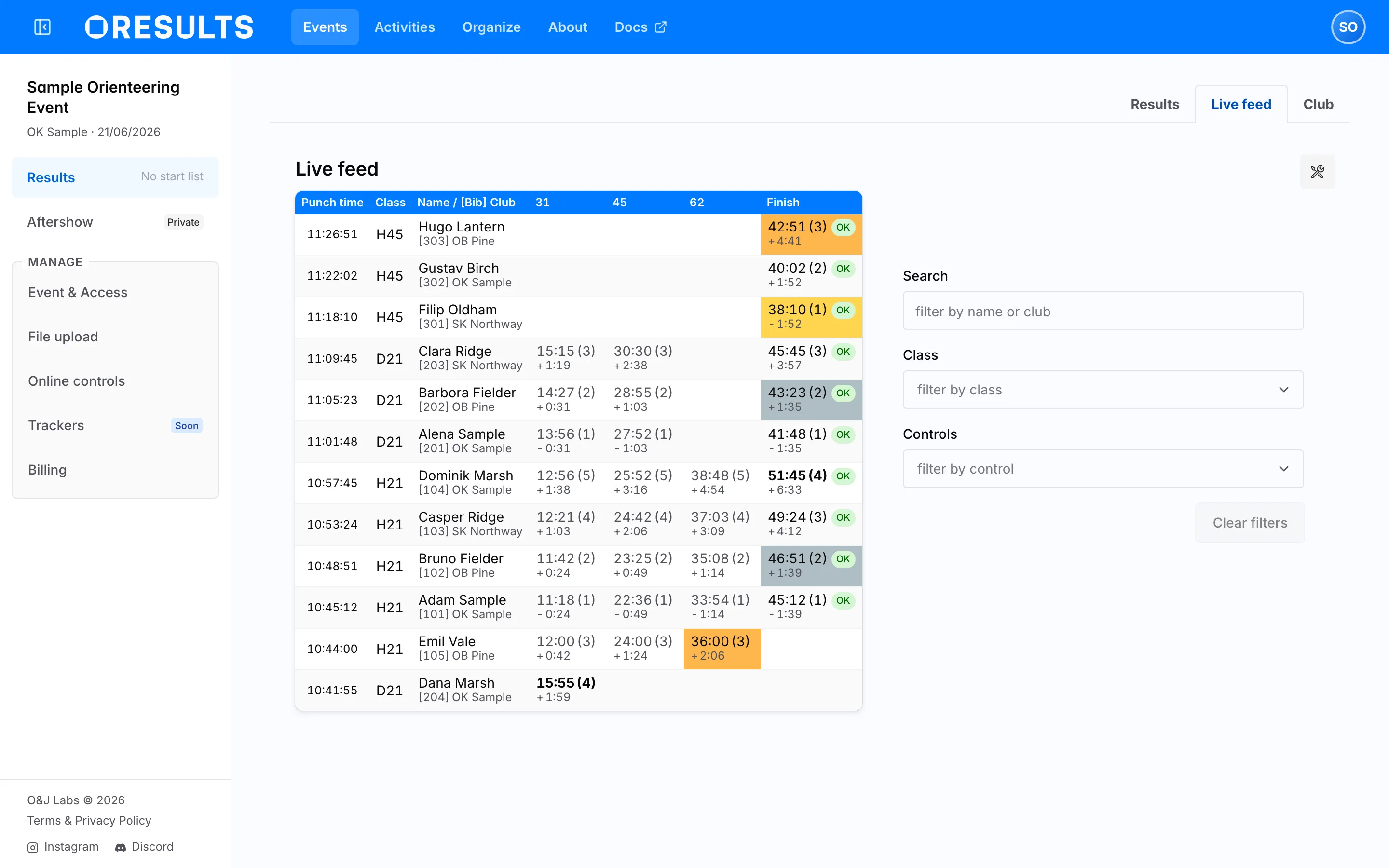
Filter
Section titled “Filter”- Search: full-text search across names and clubs
- Class: filter classes which you see in the table
- Controls: filter which controls you see in the table
What the columns mean
Section titled “What the columns mean”Each row of the table belongs to one competitor.
| Column | Holds |
|---|---|
| Punch time | The time of the competitor’s latest punch. |
| Class | The class name. Selecting it opens that class in the results. |
| Name | The competitor’s name. |
| Club | Their club, or the team name in a relay. On a narrow screen the name and club share one column. |
| Bib | The bib number. Present only when at least one competitor has one. |
| one per control | The split time at that control, filled in progressively as the competitor goes through the online controls. Selecting the control code filters the table to that control. |
| Finish | The finishing time, with the status (OK, MP, DSQ, DNF, …) as a badge inside the cell. |
The most recent punch records are in the first row: when a competitor visits a new online control, their row moves to the top of the table.
If a competitor is in first, second or third place at an online control, the split time is colored accordingly, as shown in the picture.